
Kenya Patient Summary FHIR Implementation Guide
0.1.0 - ci-build

Kenya Patient Summary FHIR Implementation Guide
0.1.0 - ci-build
Kenya Patient Summary FHIR Implementation Guide - Local Development build (v0.1.0) built by the FHIR (HL7® FHIR® Standard) Build Tools. See the Directory of published versions
A business process, or process, is a set of related activities or tasks performed together to achieve the objectives of the health Programme area, such as registration, counseling, and referrals. Workflows are a visual representation of the progression of activities (tasks, events, and interactions) that are performed within the business process. The workflow provides a story for the business process being diagrammed and is used to enhance communication and collaboration among users, stakeholders, and engineers.
| Letter | Process Name | Process ID | Personas | Objectives | Task Set |
|---|---|---|---|---|---|
| A | Client registration | KPS.A | Client, Clerk, Community Health Worker | To identify and register or update the client’s personal details so that they can benefit from health-care services.
Starting point: Client checks in at facility or is contacted by a health worker. |
|
| B | Clinical Consultation | KPS.B | Client, Health-care provider (clinician, nurse, CHW) | To conduct a comprehensive clinical assessment, document in SHR, support decision-making, and trigger follow-up care.
Starting point: Client has been registered and is being seen for a clinical visit. |
|
| C | Diagnostics | KPS.C | Client, Laboratory technologist, Health-care provider | To investigate and obtain results via on-site or off-site diagnostics.
Starting point: Provider identifies the need for testing. |
|
| D | Treatment | KPS.D | Client, Health-care provider, Pharmacist | To initiate treatment, monitor adherence, and prevent complications.
Starting point: Client has a diagnosis. |
|
| E | Immunization | KPS.E | Client, Health-care provider, Pharmacist/Vaccine Coordinator | To ensure timely vaccination based on guidelines and eligibility.
Starting point: Client assessed as eligible for immunization. |
|
| F | Emergency care | KPS.F | Client, Health worker (clinician, CHW) | To support rapid, informed emergency decisions and interventions using SHR data.
Starting point: Client identified for emergency services. |
|
| G | Referral | KPS.G | Client, Health worker (clinician, CHW) | To ensure timely referral to facilities offering unavailable services.
Starting point: Clinician determines client needs services unavailable locally. |
|
This section illustrates the workflows of the identified processes using standardized notations for business process mapping, based on the business process model and notation (BPMN) standard (11). Table below provides an overview of this notation.
| Symbol | Symbol Name | Description |
|---|---|---|
 |
Pool |
The pool assumes process control – in other words, it assigns the tasks. A pool consists of one or more “swim lanes” that depict all the individuals or types of users that are involved in carrying out the business process or workflow. Diagrams should be clear, neat and easy for all viewers to understand the relationships across the different swim lanes. For example, a pool would depict the business process of conducting an outreach activity, which involves multiple stakeholders represented by different lanes in that pool. |
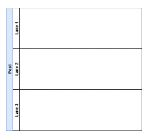 |
Swim lane | Each individual or type of user is assigned to a swim lane, a designated area for noting the activities performed or expected by that specific actor. |
 |
Start event or trigger event | The workflow diagram should contain both a start and an end event, defining the beginning and completion of the task, respectively. |
 |
Start event message | This is a type of a start event. It can include information exchanged between two systems, like data, alerts, or notifications. |
 |
End event | There can be multiple end events depicted across swim lanes, but for clarity only one per swim lane is recommended. |
 |
Activity, process, step or task | Each activity should start with a verb, e.g., “register client”, “calculate risk”. Includes all actions in a swim lane. |
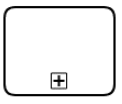 |
Activity with subprocess | Used when a task is too complex and must be detailed in another diagram. Represents a subprocess of the main activity. |
 |
Activity with business rule | Denotes a task that involves decision-support or business rules. Typically supported by a separate decision logic table. |
 |
Sequence flow | Shows the order from one task to another. Should not cross other flows and each task has one output (except gateways and end). |
 |
Message flow | Represents information passed between two pools (e.g., different facilities or systems). |
 |
Exclusive gateway | Shows a binary (e.g., yes/no) decision. Limited to two outputs. Complex logic should use “activity with business rule”. |
 |
Parallel gateway | Used to perform tasks in parallel or join multiple incoming flows. It does not evaluate conditions. |
 |
Throw – link event | Marks the end of a workflow that continues elsewhere (off-page connector). Should be followed by a catch – link. |
 |
Catch – link event | Starts a new process on a different page from the throw – link or continues a subprocess. Must be paired with a throw – link. |
 |
Ad hoc subprocess | Represents multiple activities that may run in any order, multiple times, or be skipped. |
 |
Loop activity | Represents a repeating activity until a specified condition is met. Condition is noted as an annotation. |
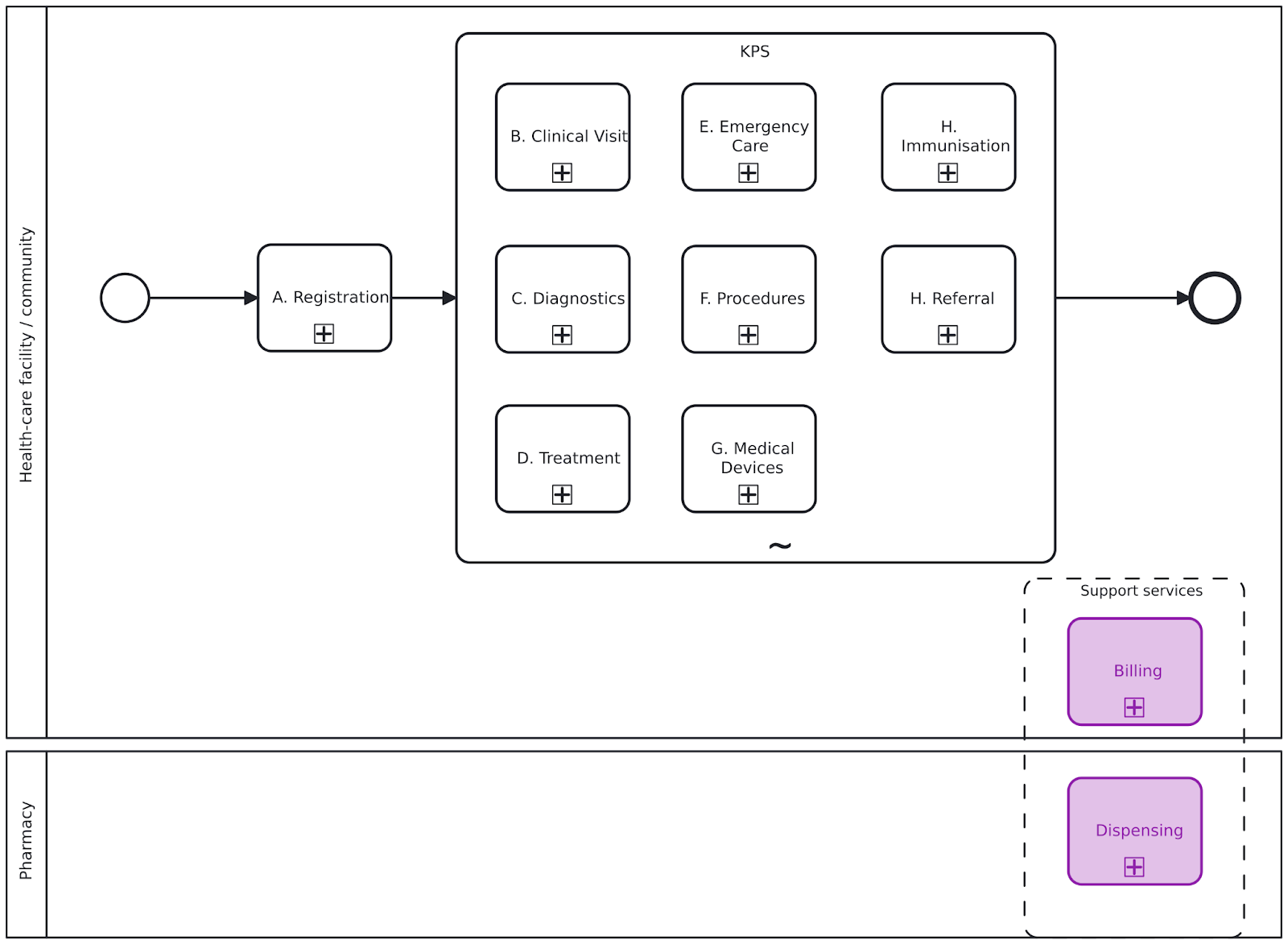
Workflows represent the progression of activities performed within the business process. They help users and stakeholders understand the relationship between activities, data elements and decision-support needs. The workflows shown depict processes that have been generalized and may not reflect variation and nuances across different settings. Also, the simplicity of the workflow may not adequately illustrate non-linear steps that may occur.
Objective: To identify and register or update the client’s personal details so that they can benefit from KPS-related services
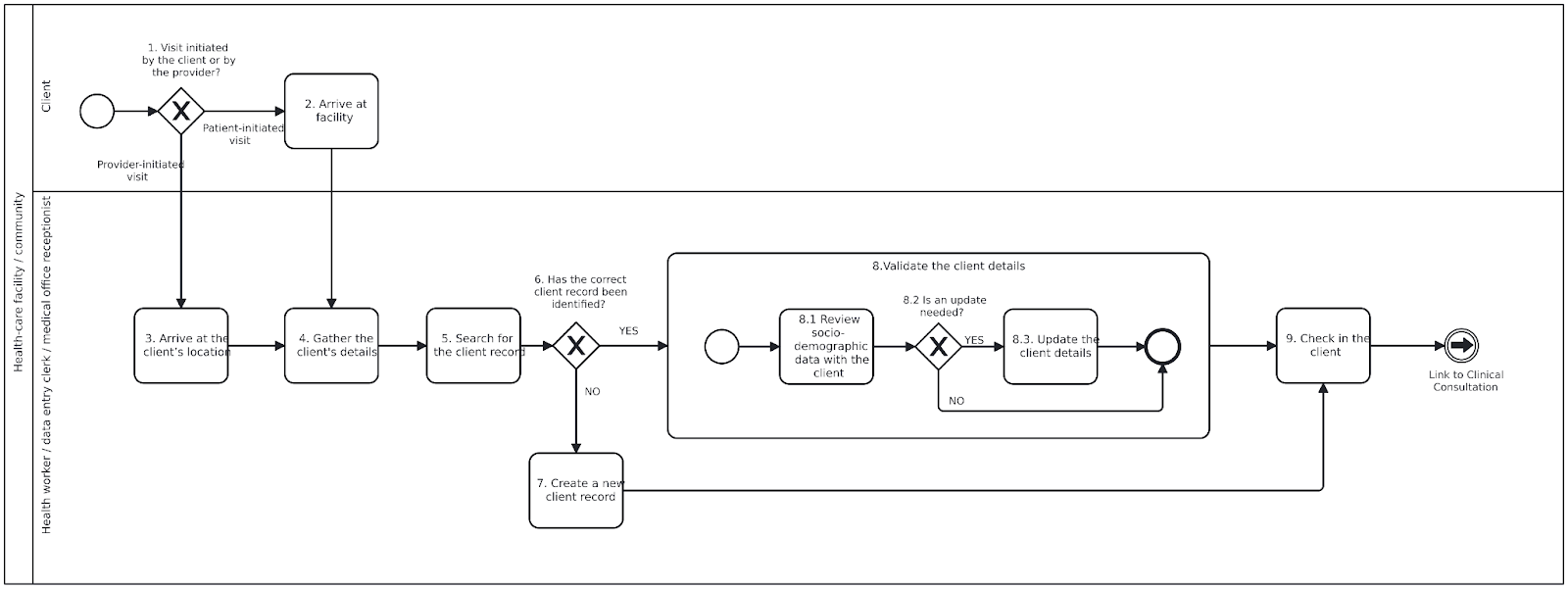
REGISTRATION BUSINESS PROCESS NOTES AND ANNOTATIONS
General note
Registration may be conducted as a stand-alone process by a data entry clerk or administrative persona ahead of the clinical visit or it may be conducted directly by the health worker as part of the overall encounter. These activities can be performed either in the health-care facility or in the community (e.g. client’s home, workplace, mobile van), depending on where the encounter takes place.
1.Was the visit initiated by the client or by the provider?
2.Client arrives at facility
3.Arrive at the client’s location
4.Gather the client’s details
5.Search for the client record
6.Has the correct client record been identified?
7.Create a new client record
8.Validate the client details
9.Checking in the client
Objective: To conduct a comprehensive clinical assessment and initiate appropriate care plan
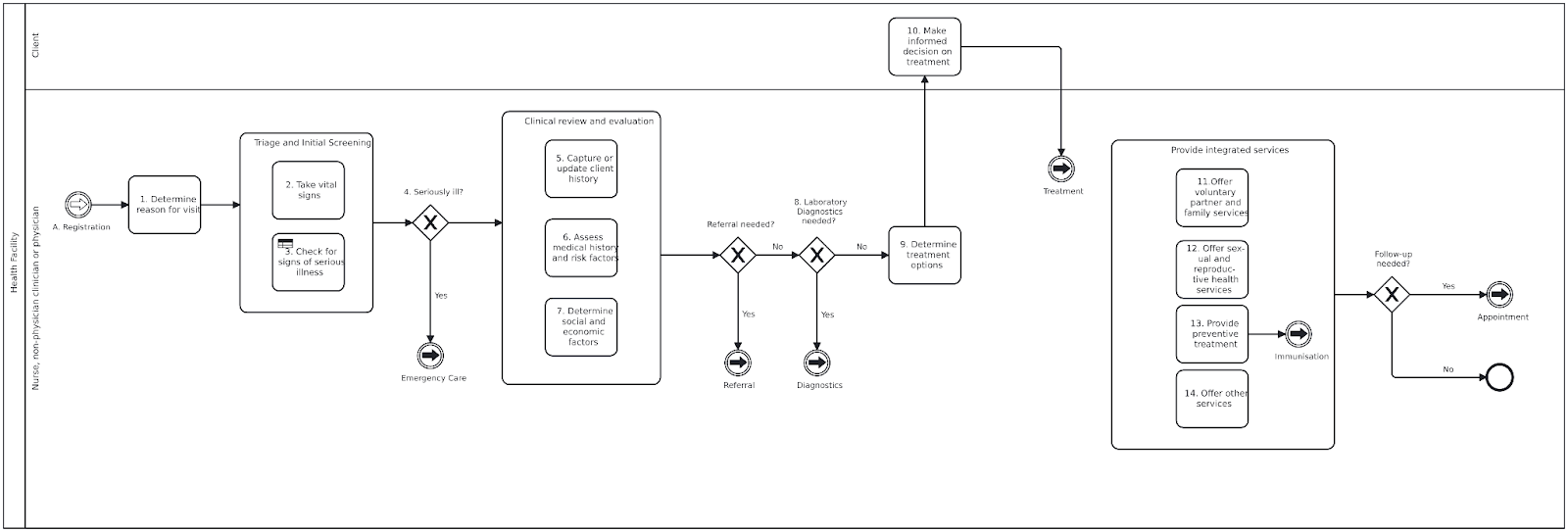
CLINICAL CONSULTATION BUSINESS PROCESS NOTES AND ANNOTATIONS Steps for clinical consultation process
1.Determine reason for visit
Initial screenings steps 2–4
Steps may be performed in parallel. One or more of these steps are often performed before meeting with the provider.
2.Take vital signs
3.Check for signs of serious illness
4.Seriously ill
5.Capture or update client history
6.Assess medical history and risk factors 7.Determine social and economic factors
– disorders due to alcohol use;
– HIV;
– smoking;
– undernutrition;
– disorders due to drug use;
– silica exposure, silicosis;
– viral hepatitis;
– other clinical risk factors, for example, treatment with anti-TNFα3, dialysis, organ or haematological transplantation.
Is referral needed?
8.Laboratory diagnostics needed?
9.Determine treatment options 10.Make informed decision on treatment
Provide integrated services, steps 11–14
11 Offer voluntary partner and family services
12 Offer sexual and reproductive health services
13 Provide preventive treatment
14 Offer other services
Follow-up needed?
Objective: To investigate and obtain results through on-site or off-site diagnostics.
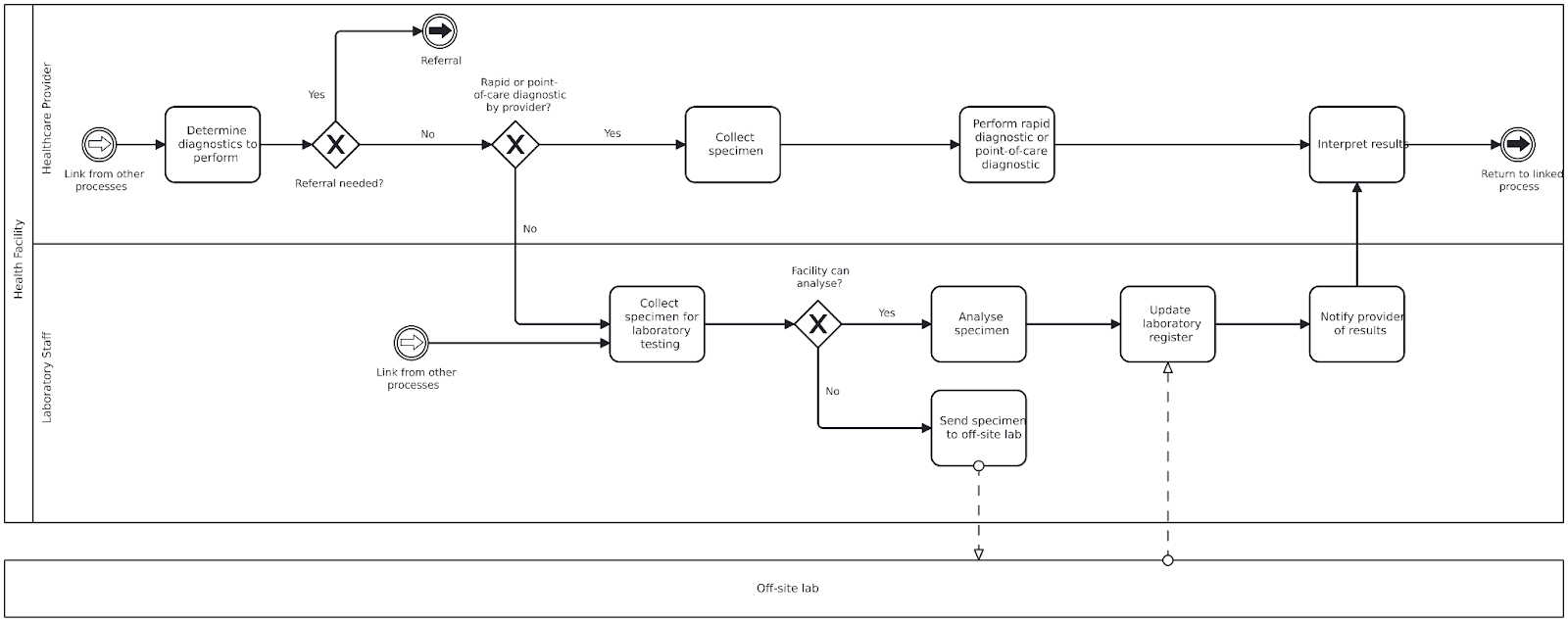
DIAGNOSTICS BUSINESS PROCESS NOTES AND ANNOTATIONS
General note
The clinician may order an investigation during an outpatient consultation or inpatient round. Investigations can include:
Steps for Diagnostic Process
Determine the diagnostics to perform
Referral needed?
An order to refer the client to another facility may be issued if the current facility cannot perform or collect the required diagnostics.
Rapid or point-of-care diagnostic by provider?
Based on available diagnostics, provider skill, and facility processes, the provider may take a specimen on-site or refer for off-site testing. Diagnostics may be performed during the visit or after, with the client returning to the provider for follow-up.
Collect specimen (Rapid/Point-of-care)
Perform rapid diagnostic or point-of-care diagnostic
Interpret results
Collect specimen for laboratory testing
Facility can analyse?
Determine if the specimen can be processed at the current facility or needs to be referred.
Analyse specimen
If analysis is possible on-site, conduct pre-analysis, analysis, and post-analysis procedures.
Send specimen to off-site laboratory
If off-site testing is needed, the facility collects and sends the specimen to another laboratory for analysis.
Update lab register
Record the test and sample information in the laboratory register for tracking and documentation.
Notify provider of results
Results are returned to the ordering facility or provider. The client may also receive automated result notifications.
Review lab results
The provider reviews results and determines if client follow-up is needed based on findings.
Objective: To initiate the appropriate treatment and perform the necessary follow- up examinations to ensure that the correct treatment is followed and that the patient adheres to it.
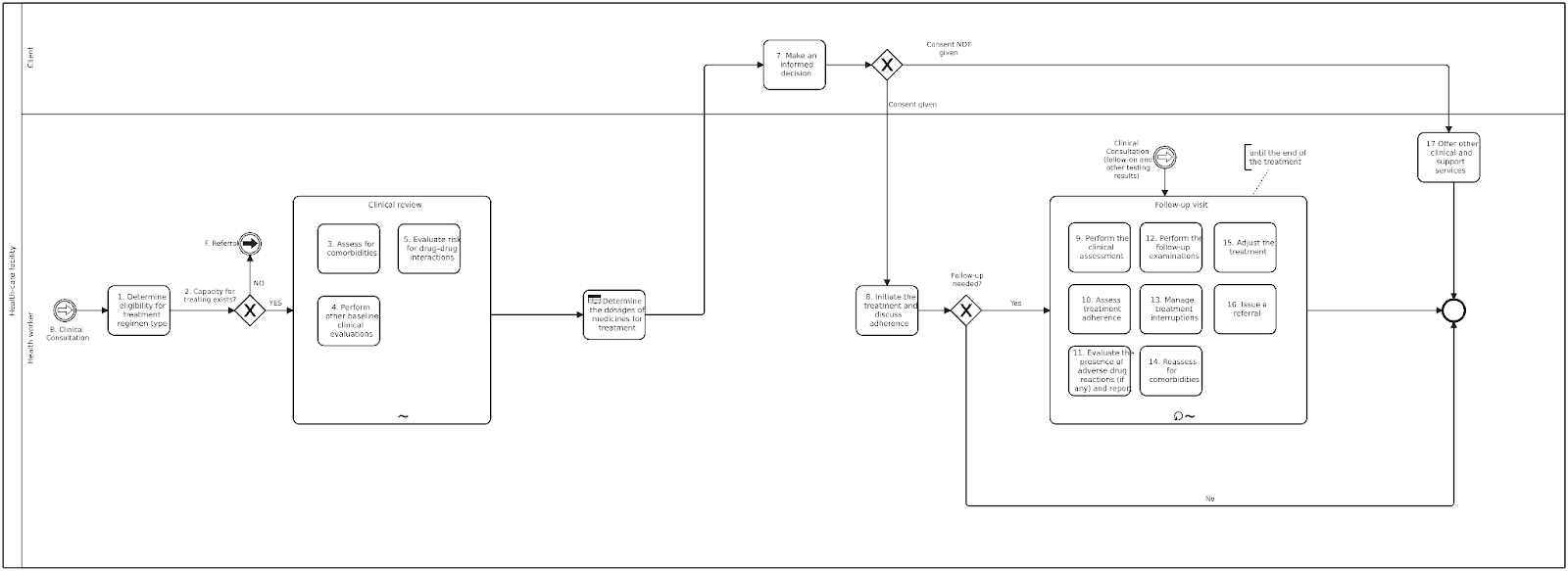
TREATMENT BUSINESS PROCESS NOTES AND ANNOTATIONS
Steps for the treatment process
Determine eligibility for treatment regimen type
The health worker determines whether the client is eligible based on laboratory results and previous clinical evaluation, for a regimen designed to treat.
Capacity for treating exists
When treatment cannot be started or continued in the current facility (e.g. lack of skills, knowledge, stock of medicines), a referral is issued to transfer the patient to a new treatment facility.
Assess for comorbidities
Assess comorbidities and risk factors (e.g. diabetes, HIV, smoking, COVID-19) to guide treatment decisions and interpret adverse reactions.
Perform other baseline clinical evaluations
For subgroups (e.g. pregnant women, elderly), perform clinical, ECG, and lab evaluations before starting treatment.
Evaluate drug–drug interactions
Evaluate for interactions between treatment drugs and other medications the patient is taking.
Determine the dosages of medicines for treatment
Determine medicine dosages based on age and weight band.
Make an informed decision
Align treatment with WHO standards. Obtain informed consent. Counsel patients who refuse treatment.
Initiate the treatment and discuss adherence
Once consent is obtained and dosages determined, begin treatment and support adherence through:
Is follow-up needed?
Monitor clinical response and symptoms related to long-term drug use.
Assess treatment adherence
If adherence is poor:
Evaluate the presence of adverse drug reactions (if any) and report
Actively monitor and report any adverse reactions to the national pharmacovigilance system.
Perform the follow-up examinations
Conduct examinations as per the monitoring schedule to identify and address issues early.
Manage treatment interruptions
Address reasons for interruption (e.g. stock-outs, side effects), counsel the client, and resume treatment as needed.
Reassess for comorbidities
Repeat assessments and adjust the treatment approach if new or unresolved conditions are identified.
Adjust the treatment
Based on evaluation results, adjust composition/duration or change the regimen. Refer if necessary.
Issue a referral
Refer for continued care of comorbidities or adverse events. Ensure patient preferences and clear referral pathways.
Offer other clinical and support services
If treatment cannot be started, provide other clinical or social support services tailored to the patient’s needs.
Objective: To ensure timely administration of vaccines in line with national guidelines and patient eligibility, especially during pregnancy.
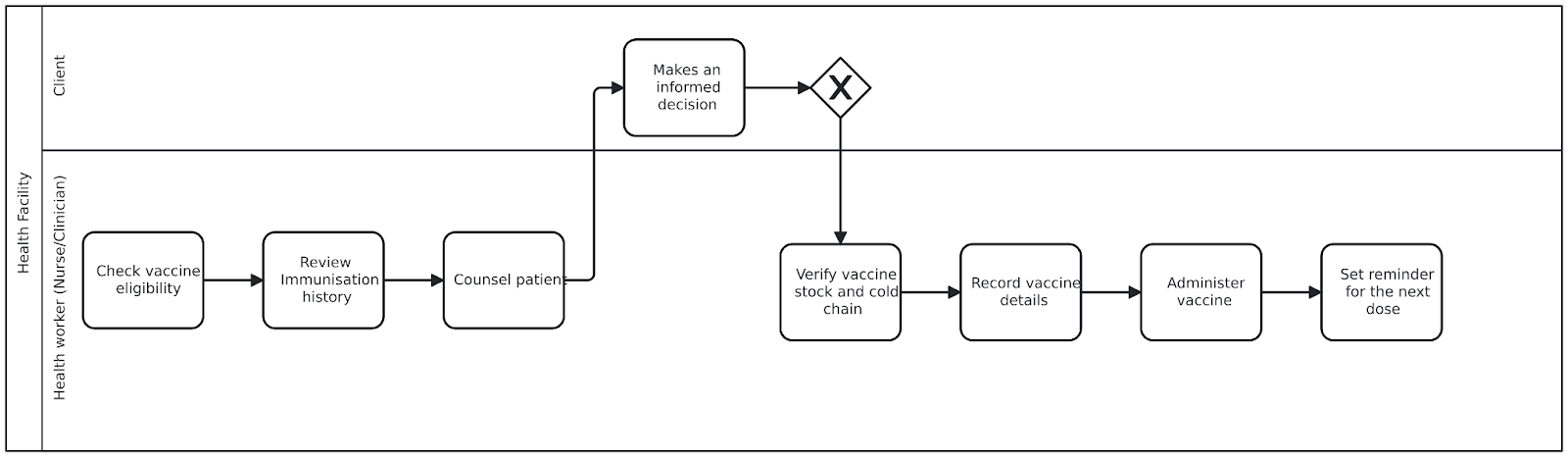
IMMUNISATION BUSINESS PROCESS AND ANNOTATIONS
Check vaccine eligibility
The clinician assesses whether the patient is due for any vaccines based on gestational age, immunization history, and national guidelines (e.g., KEPI). This check may be triggered by clinical workflow or decision support systems.
Review immunisation history
The clinician or nurse reviews the patient’s immunization records retrieved from EMR and SHR to avoid duplication and determine whether the vaccine is the first dose, a second dose, or a booster.
Counsel patient
The patient is briefed on the importance of the vaccine, its expected benefits, and any potential side effects. Risks are contextualized, such as the prevention of neonatal tetanus.
Make an informed decision
The patient engages in discussion, may ask questions, and gives formal consent to proceed. Consent is documented digitally (e.g., checkbox or e-signature) or in writing.
Verify vaccine stock and cold chain
The nurse checks that the required vaccine is available, within expiry date, and stored properly under cold chain conditions. Verification may include checking VVM (Vaccine Vial Monitor) or barcodes in the stock system.
Record vaccine details
The provider records all relevant data, including:
Administer vaccine
The vaccine is given following national protocols — route (e.g., intramuscular), site (e.g., upper arm), and dose (e.g., 0.5 mL TT).
Set reminder for the next dose
For multi-dose schedules (e.g., TT2), a reminder is entered into the EMR. The reminder aligns with scheduled milestones and national immunization guidelines.
Objective: To initiate the appropriate treatment and perform the necessary follow- up examinations to ensure that the correct treatment is followed and that the patient adheres to it.
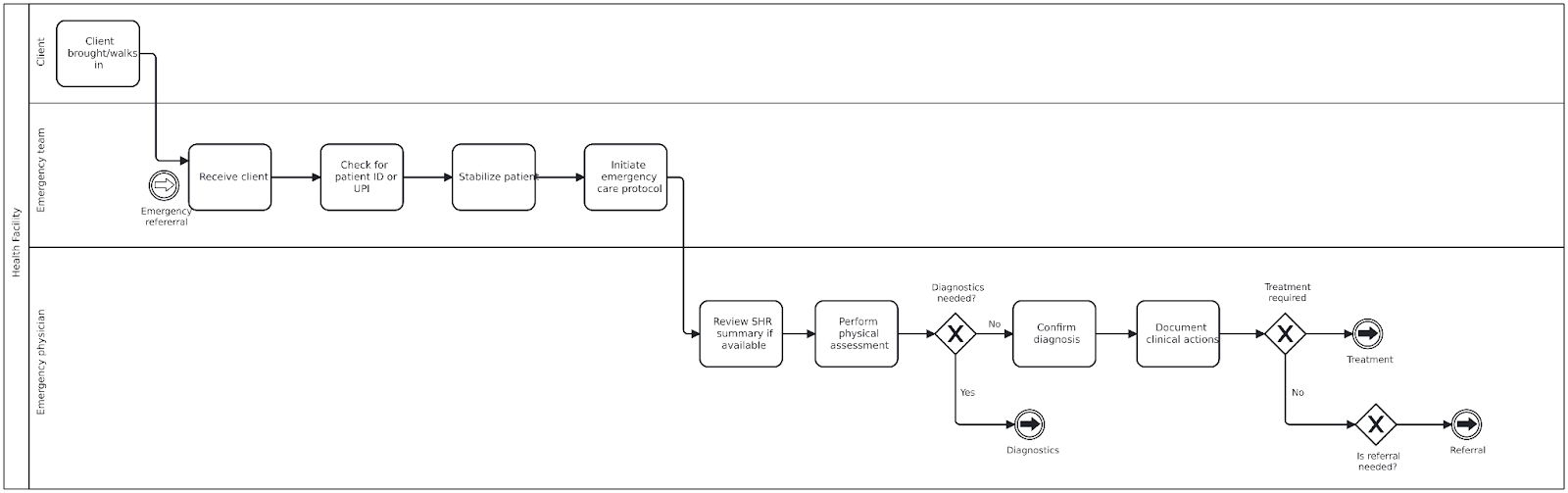
EMERGENCY CARE BUSINESS PROCESS NOTES AND ANNOTATIONS
General note
Objective: To provide timely and appropriate referrals to another health-care facility that can provide services unavailable within this facility
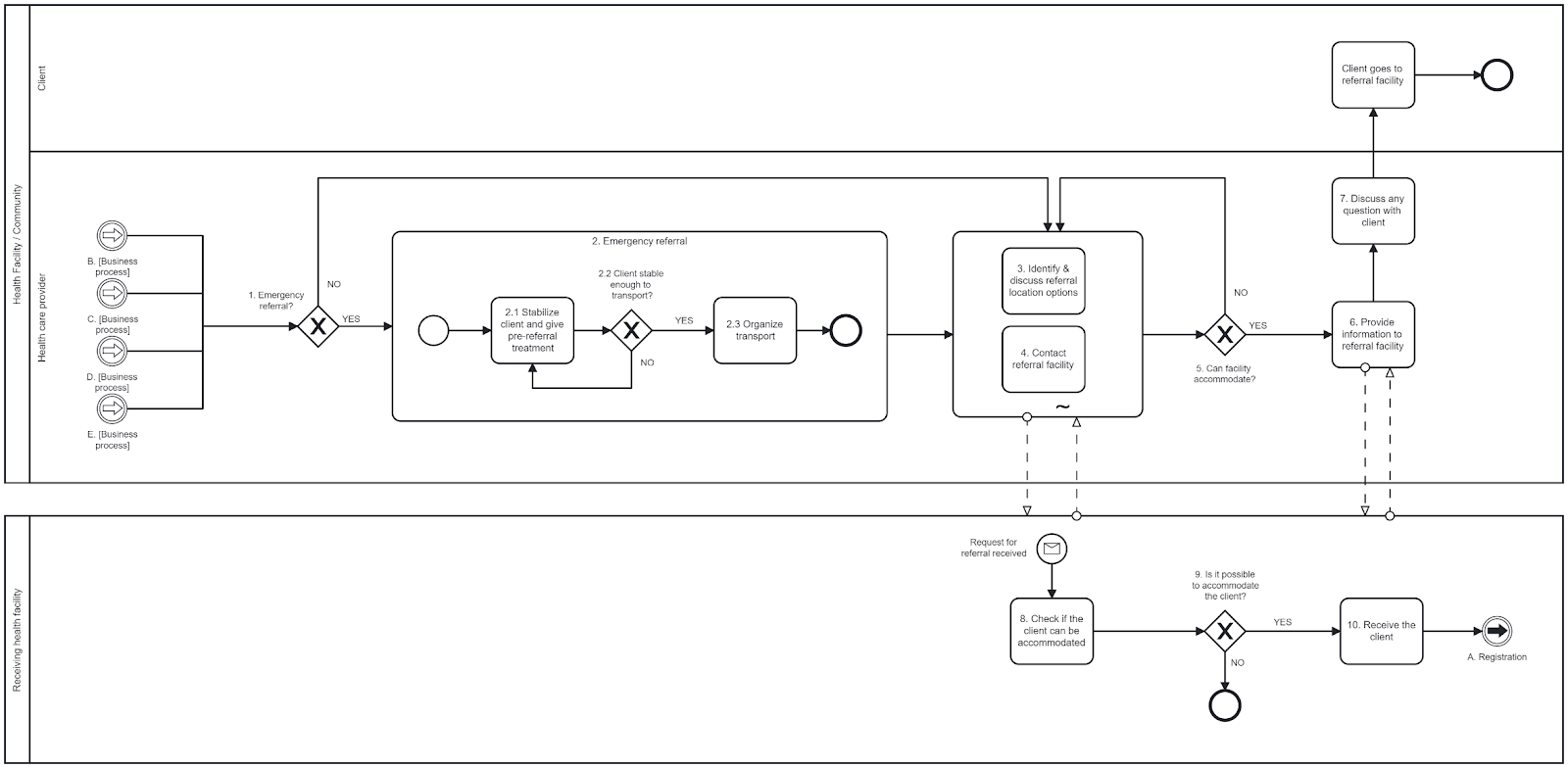
REFERRAL BUSINESS PROCESS NOTES AND ANNOTATIONS
General notes
Examples of reasons for referral include:
Emergency referral?
If the client needs immediate referral due to an emergency situation, bypass standard referral steps.
In an emergency, a referral can be made at any time, including during diagnosis and treatment encounters.
Emergency referral
Identify and discuss referral location options
In discussion with the client and their relatives, decide where the client will be referred to. Discussions include:
Either the client or the client’s relatives should decide on a referral location based on their preferences.
Contact referral facility
Health workers should contact the referral facility to determine whether that facility can accommodate such a referral.
Can the facility accommodate?
Check whether facility can accommodate the client and provide the services needed.
If the facility can accommodate the client, move on to step 6.
Otherwise, find a different facility that is able to accommodate the client.
A system can be set up to catalogue referral facilities, and what type of referral needs they can handle to accommodate a referral.
Provide information to the receiving facility
Make an appointment, if needed.
If not an emergency referral, the client or family arranges transport.
For emergency referrals, the health-care facility arranges transport, usually by phoning the district for an ambulance or other vehicle, and informing the receiving facility that the emergency client is on the way.
Fill out a referral form, which can include notification of the referral destination.
Provide the necessary clinical, sociodemographic and identity information to the referral facility. This can be done digitally if the appropriate systems are in place.
Discuss any questions with the client
Discuss any of the client’s questions or concerns.
Check whether the client can be accommodated
The receiving facility evaluates the needs and assesses if the client can receive the services needed.
Is it possible to accommodate the client?
If the receiving facility cannot accommodate the client, it will inform the source facility. If accommodation for the client is possible, move on to step 10.
Receive the client
The receiving health-care facility receives the client, along with all the necessary clinical, sociodemographic and identification information, and provides the services. If both facilities use digital systems with interoperability standards in place, the information can be exchanged digitally in a faster and more reliable way.